AI resume screening software
Binary's AI reviews every candidate against your own criteria, resume, video answers and assignments included, and gives you a score with a reasoning for each one. Run it from the dashboard, Slack, or Claude and ChatGPT. Free plan included.
How AI screening works
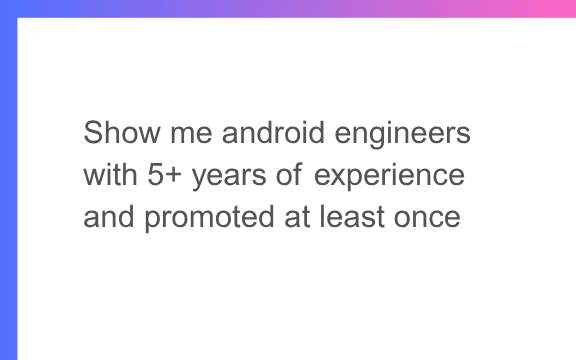
Set your criteria
Describe your screening criteria in plain English. You can always modify it later.
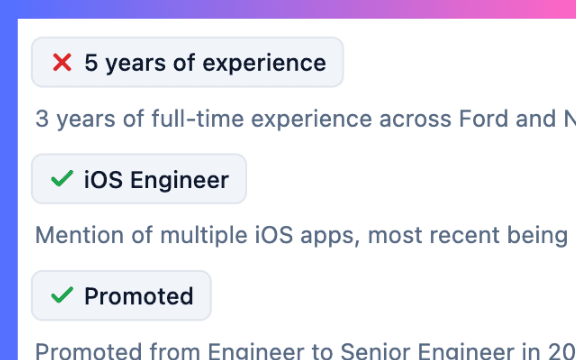
AI does a deep review
AI reads the full resume and scans it for each criterion.
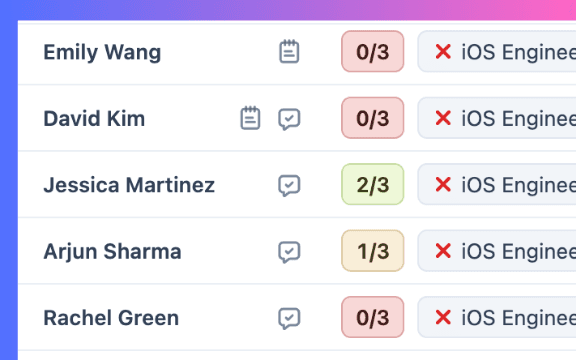
See top candidates
Get a score for every candidate with criteria breakup and reasoning.
Trusted by 600+ startups


Why teams use Binary's AI screening
- Transparent scoring
Every criterion comes with a reasoning, not just a number.
- Deep review
Full resume parsing, video answers, assignment submissions and smart search, not just keyword matching.
- Criteria you control
Add, remove or edit criteria any time, on any job, and save a rubric as an AI Skill to reuse it.
- Works where you work
Run it from the Binary dashboard, ask the Slack agent, or screen a whole pipeline from Claude or ChatGPT over MCP.
- Included on the free plan
$1 of AI credits a month screens about 200 candidates, free forever. No credit card needed.
- Built for volume
Screen hundreds of candidates in less than 60 seconds.
Screen candidates from Claude or ChatGPT
Screening is not locked inside the dashboard. Connect the Binary MCP server to Claude, ChatGPT, Codex, Grok or Cursor and ask it to screen a whole pipeline. It fetches candidates in batches, scores them against the job description and writes the results back into Binary as a filterable column, so your team sees the same scores in the dashboard. MCP is included on every plan, including Free.
- "Screen everyone in the Backend Engineer pipeline against the JD and write the scores back as a column"
- "Which applicants from the last 7 days check the most boxes? Shortlist the top 10"
- "Re-run screening on the Design role with "3+ years at a B2B SaaS company" added as a criterion"
AI candidate screening with the agent, Slack and AI Skills
The same screening engine sits behind the BinaryAI agent, which has every capability the MCP server does. Ask it "who are the top 10 for the backend role?" in the dashboard or in Slack and it answers with scores and reasoning. Save your screening rubric as an AI Skill and call it with "/" on any job, so every role is screened the same way without retyping the criteria.
Screening covers more than the CV. Resume autofill fills candidate details from the uploaded resume, and take-home assignment submissions are reviewed against the same criteria. Video questions matter most: as more text answers are written by AI, a recorded answer is the quickest way to hear how a candidate actually thinks, and the AI transcribes and scores it with the rest of the application.
Bulk resume screening that stays fair and explainable
Recruitment AI is classed as high-risk under the EU AI Act, and NYC Local Law 144 requires bias audits of automated employment decision tools. Binary is built so you can meet those obligations with a human making the final call:
- Human in the loop: the AI scores and explains, a person makes the shortlist or reject decision.
- Per-criterion reasoning on every score, so a reviewer can see why and overrule it.
- Criteria are yours, in plain English, and editable at any time; nothing is a hidden model weight.
- Export every score and reasoning as a spreadsheet for review or a bias audit.
Is AI candidate screening actually free?
Yes. AI screening is part of the free-forever plan, not a trial. The free plan's $1 of monthly AI credits screens about 200 candidates a month. Starter ($10), Business ($25) and Pro ($100) include credits for roughly 2,000, 5,000 and 20,000 screenings. You can add extra credits on any paid plan.
Frequently asked questions
How does Binary's AI candidate screening work?
You describe the criteria you are looking for in plain English. Binary's AI then reviews every candidate against those criteria, reading the full resume and watching video answers if your form has them. Each candidate gets a score, like 5/7, along with a written reasoning for every criterion.
Will the AI go through resume data too?
Yes. The AI parses the full resume, not just a few keywords, and uses smart search to understand context, so it can pick up relevant experience even when a candidate phrases things differently. Resume autofill also fills candidate details from the CV at application time, so the profile the AI reviews is complete.
Can I decide or change my screening criteria?
Yes. You set the criteria yourself, and they're never locked in. You can add a new one, remove one that's no longer relevant, or edit the wording at any time, and the AI re-evaluates candidates against the updated set. Save a rubric you reuse as an AI Skill and call it with "/" in AI chat.
Can I screen candidates from Claude or ChatGPT?
Yes. Connect the Binary MCP server to Claude, ChatGPT, Codex, Grok or Cursor and ask it to screen a whole pipeline against the job description. It fetches the candidates in batches, scores them and writes the results back into Binary as a filterable column, so your team sees the same scores in the dashboard. MCP is included on every plan, including Free.
How is this different from keyword-based resume screening?
Older resume screening tools mostly match keywords, so a strong candidate who phrases things differently can get filtered out. Binary's AI understands context, so it evaluates whether a candidate genuinely meets a criterion and explains its reasoning, rather than just checking whether a word appears on the page.
How do I add candidates for AI screening?
There are two ways. You can create a hiring form on Binary and let candidates apply directly, or import an existing candidate list, Google Sheet or ATS export into a live job. AI screening works the same way for both, scoring every candidate against your criteria. It also reviews assignment submissions and video answers, not only resumes.
Is AI candidate screening actually free?
Yes. AI screening is part of the free-forever plan, not a trial. The free plan's $1 of monthly AI credits screens about 200 candidates a month. Starter ($10), Business ($25) and Pro ($100) include credits for roughly 2,000, 5,000 and 20,000 screenings. You can add extra credits on any paid plan. Each AI review costs $0.005 of credit, and credits are shared with candidate messaging.
Can I trust the AI's screening decisions?
The AI is built to support your judgement, not replace it. Every score comes with a reasoning per criterion, so you can quickly verify why a candidate was scored the way they were before you act on it. You always stay in control of the final reject or shortlist decision, and you can export every score and reasoning for an audit.
Is AI screening compliant with the EU AI Act and NYC Local Law 144?
Binary is designed for human-in-the-loop use: the AI scores and explains, a person decides. Every criterion is one you wrote, every score carries a written reasoning, and scores and reasonings can be exported for review or a bias audit. The EU AI Act treats recruitment AI as high-risk and NYC Local Law 144 requires bias audits of automated employment decision tools, so keep a human making the final call and run the audits your jurisdiction requires. Binary gives you the transparency and export those processes need, but it is not a substitute for your own legal review.
Can I bulk-reject candidates after AI screening?
Yes. Once candidates are scored, you can sort by score, skim the reasoning, and bulk-reject or shortlist the ones that clearly do or don't fit, closing the loop on most of your pipeline in seconds.
Can I export the AI screening results?
Yes. You can export candidate scores and the reasoning behind them as a spreadsheet at any time, whether the candidates applied through a Binary form or were imported from elsewhere.